Five clients. Twelve agents.
One of you.
Logic Loop is a free, open-source desktop workspace for AI agency owners and forward-deployed engineers. Run Claude Code, Codex and four more agents across every client repo, and come back to each one knowing what changed, what's waiting on you and what's next.
Free · No account · Runs on your machine
Running agents is easy. Switching clients is where the hours go.
Every return to a client repo costs minutes of scrollback: what did the agent ask, what did you decide, what ships next. Multiply that by every client, every day. Agent dashboards track the agent's context. Logic Loop tracks yours.
The question buried mid-paragraph
An agent asks two questions. You answer one. The second becomes whatever the model assumed, and twenty turns get built on top of it.
The assumption nobody approved
"I'll assume the client wants test mode." The terminal shows a finished task. Nothing shows the choice that got made for you.
The Friday update from memory
The client asks what shipped this week. You rebuild it from git log, Slack and whichever tabs you still have open.
One workspace for every repo you're on the hook for.
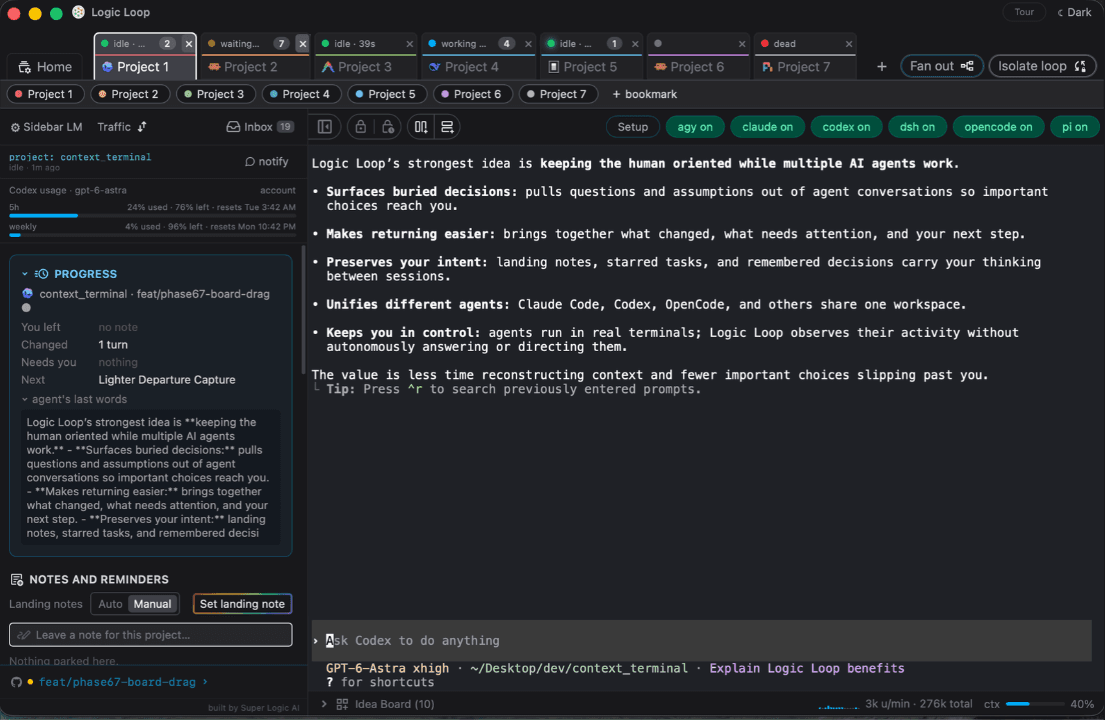
Real terminals, browser-style tabs, and a sidebar per project that turns agent activity into the things an agency actually runs on: decisions, next steps, status updates and hours.
Every client on one screen
Home lists every project you've opened, what changed and how many decisions are waiting. Cmd+K opens a cross-project inbox of everything that needs you.
Catch every fork the agent puts to you
After each turn, a model reads what the agent wrote and pulls out its questions, choices and stated assumptions, even the ones buried mid-paragraph. Answer now drops your reply in the right tab.
Decisions that live in the client repo
Remember a confirmed decision and it lands in .logic-loop/DECISIONS.md inside the project. Link it from the repo's agent instructions so the next session starts from it.
Client updates you copy, not write
Each project's Overview collects open decisions, the next action and a recent work log, then builds a status update you can paste straight into Slack or email.
Your hours and the agents', per project
Counts your active time per project from input presence (never what you type) with a 15-minute idle cap, plus agent token spend per thread. Handy when the work is billed by the hour.
Since You Left, then Next
Come back to a digest of files touched, commands run, errors and decisions opened while you were on another client, plus one concrete next action.
It watches.
You act.
Client work means someone else's code and someone else's secrets. Logic Loop is built so the tool in the middle is never the risk.
Never reads your screen
Status comes from each agent's own hooks, transcripts or plugin API. Terminal bytes pass through untouched.
Never types for you
The app never writes into a running session on its own. That's an architectural rule, not a setting.
Local SQLite, append-only
Every panel is a plain SQL view over an event log on your machine. If ingestion breaks, your terminals keep working.
You pick the model
The three features that call a model run through your own Claude or Codex CLI, or LM Studio and Ollama to keep every call local. Default extraction costs under a tenth of a cent.
Agent config is only touched when you click Enable, and your own hooks stay put. Prefer to keep your global Claude settings untouched? Tab-only mode passes Logic Loop's hooks with --settings instead.
Clone it. Build it. Point it at a client repo.
Build it
Clone the repo and build with Rust and Node 22.12+. No prebuilt downloads yet; this is where early users come in.
Enable an agent
Setup detects the agent CLIs you have. Click Enable and Logic Loop writes its hook into that agent's config. Disable removes it byte for byte.
Open a client repo
Pick a project folder and an agent. Work exactly like you do today. The sidebar catches you up every time you come back.
$ git clone https://github.com/SuperLogicAI/Logic-Loop.git$ cd Logic-Loop$ npm ci$ npm run tauri build$ open "src-tauri/target/release/bundle/macos/Logic Loop.app"
Built in the open. Better with you in it.
Logic Loop is early and ships every few days. If you run client builds with agents, you already know what it should do next. Here's how to get in.
Write an adapter
Gemini and Copilot are on the roadmap. If your agent emits structured events, it can plug in.
Request or build oneTell us where it broke
Tried it on a real client repo? The rough edges you hit are the most useful thing you can send.
Send feedbackGrab a first issue
Scoped, labeled and ready. CONTRIBUTING.md covers the merge gates and the architecture rules.
Good first issuesJoin the Discussions
How you run agents across clients, adapter ideas, workflows that work. Ask anything.
Open Discussions- 1. Never parse terminal output for meaning.
- 2. Fail open: a broken panel never touches a terminal.
- 3. Never act for the human.
We run our own client builds through it.
Super Logic AI builds AI automation for small businesses. Logic Loop started as the tool we needed to keep our own client builds straight, and every feature ships only after it survives our daily use.
Want the builders, not just the tool? Meet our forward-deployed engineersStar it. Run it.
Tell us where it broke.
Agent dashboards track the agent's context. Logic Loop tracks yours.